How to Respond to Every Lead in Under 90 Seconds Without Hiring Anyone
How to Respond to Every Lead in Under 90 Seconds Without Hiring Anyone (2026)
There is one number every small business owner needs to understand before anything else in this article.
If you respond to a new lead within the first 60 seconds, you are 391 percent more likely to convert them into a paying client compared to responding an hour later. If you wait five minutes, that advantage drops by 80 percent. If you wait 24 hours, your chances of ever converting that lead fall to almost zero.
Those numbers are not theoretical. They come from real sales data tracked across hundreds of thousands of inbound leads in the United States. And they explain something that most small business owners experience but cannot quite put their finger on: why some leads convert easily and others simply disappear, never to respond again no matter how many times you follow up.
The answer, almost always, is response time.
The leads did not go cold because they stopped needing your service. They went cold because someone else responded faster than you did. In most local service markets, the business that shows up first wins the client. Not the most experienced. Not the most affordable. The first one to show up.
The problem is that responding to every lead within 90 seconds manually is impossible for a small business team doing actual work. You cannot sit by a phone watching for form submissions 24 hours a day. But you can build a system that does it for you, every single time, whether you are on a job site, with another client, or asleep.
That is exactly what this article teaches you how to build.
By the time you finish reading this, you will understand why speed to lead matters more than almost any other operational factor in a service business, what a properly built automated response system looks like, and the exact step-by-step process to set one up using tools that are accessible and affordable for a small business budget.
Why Most Small Businesses Are Losing Leads They Do Not Even Know About
Before we get into the solution, it is worth being honest about how and where leads actually disappear. In most small businesses, the loss is completely invisible. Nobody sees it happening. The lead submits a form, sends a message, or calls and gets no answer, and then simply never comes back. There is no notification that a potential client just left. There is no record of the missed opportunity. The business just does not grow as fast as it should, and the owner blames the marketing when the real problem is the follow-up gap that follows it.
Here are the three most common places leads disappear in small businesses, and why each one happens.
The website form that goes nowhere fast. A lead fills out your contact form. The submission gets emailed to a general inbox that might be checked twice a day when things are normal, once a day when things are busy, and sporadically when someone is swamped. By the time anyone writes back, hours have passed. The lead has already moved on, and the follow-up email gets no response because the window is closed.
The missed call with no follow-up. Someone calls your business. Nobody answers because you are with a client, your team is on a job, or it is outside business hours. There is no voicemail, or there is a voicemail nobody checks until the next morning, or the callback happens eventually but too late. The lead called three other businesses and booked with the one who called back first.
The social media message nobody saw. A lead sends a message on Facebook, Instagram, or Google Business. These messages live in completely separate inboxes from your email and phone. Unless someone is actively checking every platform multiple times a day, messages go unread for hours. By the time they are found, the conversation is already cold.
Each of these failure points is invisible until you set up a system to measure them. And each one is completely fixable, not by hiring more people, but by building automation that catches every entry point and responds immediately regardless of what else is happening in your business.
Our CRM setup and management service at Idievo is built almost entirely around solving these three problems. Every client we onboard has at least one of them. Most have all three.
What a 90-Second Lead Response System Actually Does
An automated lead response system is not a robot pretending to be a human. Done correctly, it is a series of warm, personalized, timely touchpoints that make every new lead feel acknowledged within seconds of reaching out, with a genuine promise of a personal conversation to follow.
Here is exactly what happens from the moment a lead comes in when this system is properly built:
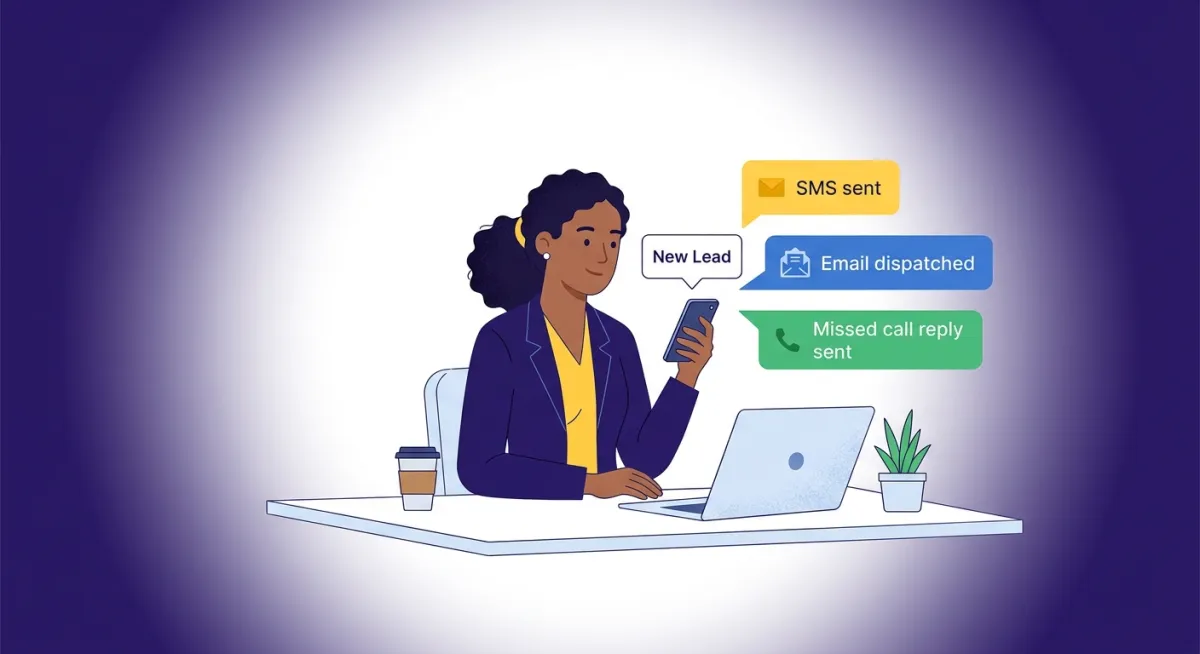
A lead submits a form, sends a social media message, misses a call, or contacts you through any connected channel. Within 30 to 90 seconds, they receive a personalized SMS that acknowledges their inquiry and tells them exactly what happens next. Two to three minutes later, they receive a confirmation email, again personalized, that reinforces the professionalism of your business. Behind the scenes, their contact record is automatically created in your CRM, they are added to the right pipeline stage, your team receives an internal notification with the lead's details, and a follow-up task is created for a personal response.
If they do not respond within a set period, the system sends a follow-up. If they do not open the email, a different email goes out the next day. The system keeps the lead warm and keeps moving them forward until they book an appointment, respond, or explicitly opt out.
All of this runs automatically, 24 hours a day, seven days a week, with no manual input required from your team. The only thing your team needs to do is follow through on the conversations the system opens.
This is precisely what a properly configured GoHighLevel CRM does when it is built correctly. It is not magic. It is a well-designed system doing exactly what a well-designed system should do: eliminating the gaps where leads fall through, and making your business show up faster and more consistently than any competitor who is still doing this manually.
The Exact Step-by-Step Setup
Here is the complete process for building this system. I am writing this so that even someone who has never touched a CRM before can follow along and understand what needs to be built and why each piece matters.
Step 1: Centralize Every Lead Source Into One Inbox
The single most important foundational step is connecting every channel where leads can reach you into one unified place. Right now, if your leads come through your website, Facebook, Instagram, Google Business, phone, and live chat, those conversations are happening in six completely separate places. No single automated system can respond to all of them unless all of them feed into one central inbox.
In a platform like GoHighLevel, this central place is called the Conversation Inbox. It connects your website forms, social media messages, SMS, phone calls, email, and live chat into one stream. Your team looks at one screen. Your automation watches one stream. Nothing falls through.
Before you build a single automation, sit down and list every channel where a lead can currently contact your business. For most small businesses that list looks something like this:
Website contact form, website live chat, Facebook Messenger, Instagram DMs, Google Business messages, inbound phone calls, SMS to your business number, and email inquiries. Every single channel on that list needs to be connected to your central inbox before the automation you build in the steps below will work reliably.
If you are not sure which channels to prioritize, start with your website form and your phone number. These are almost always the highest volume lead sources for local service businesses and they are the easiest to connect to a CRM like GoHighLevel.
Our marketing automation service at Idievo handles this entire setup as part of the onboarding process for every new client. Connecting all lead sources correctly before building automation is something most businesses get wrong the first time when they try to do it themselves, and it results in an automation that works for some leads but misses others.
Step 2: Write and Configure Your Instant SMS Response
This is the most impactful single action in the entire system. The moment a lead comes in from any connected source, an automated SMS goes out within 90 seconds. SMS is the right channel for the first response because it has an average open rate of over 95 percent and the vast majority of people read a text within three minutes of receiving it.
Here is what an effective instant SMS looks like for a service business. Read this carefully because the specific words you use matter more than most people realize:
"Hi [First Name], this is [Your Name] from [Business Name]. Just got your message and wanted to reach out right away. We will have someone follow up with you personally within the next hour. Is there a good time today for a quick call? — [Your Name]"
Every word in that message is doing something. The personalized first name immediately signals this is not spam. Your name and business name confirm legitimacy. The phrase "just got your message" creates the impression of immediacy. The specific timeframe "within the next hour" sets a clear expectation. The question at the end invites a response, which starts a real conversation.
The worst version of this message is the generic one. "Thank you for contacting us. We will be in touch soon." Nobody responds to that. It feels automated and cold and creates no urgency and no reason to reply.
Write your instant SMS in the same tone you would use if you were texting a potential client yourself. Warm, direct, human, and specific. If you want help writing this message in a way that actually converts, our CRM setup and management service includes custom message writing for every automation we build.
In GoHighLevel, this SMS is configured as the first action in a Workflow. The trigger is the lead source — form submission, missed call, or social message — and the immediate action is the SMS going out. No delay. No waiting for a human to see it. Instant.
Step 3: Build Your Confirmation Email
Two to three minutes after the SMS fires, the lead receives a confirmation email. The email serves a different purpose from the SMS. Where the SMS is about speed and immediacy, the email is about professionalism and trust. It gives the lead something they can refer back to, and it reinforces the credibility of your business.
Here is what an effective confirmation email looks like:
Subject: We received your inquiry, [First Name]
Body:
Hi [First Name],
Thank you for reaching out to [Business Name].
Your message came through and a member of our team will be in contact with you personally within the next few hours. We want to make sure we have a proper conversation about what you are looking for so we can be genuinely helpful.
In the meantime, if you have any questions you can reply directly to this email or text us at [phone number]. You can also learn more about what we do at [website].
Looking forward to speaking with you.
[Your Name]
[Title]
[Business Name]
[Contact details]
That email takes less than 30 seconds to read. It sets clear expectations. It provides multiple ways to reach you. It links back to your website. And it closes with a human name rather than a generic sign-off.
For Idievo clients, the confirmation email is always connected to the client's specific website, services page, and contact page so every touchpoint is bringing the lead deeper into the brand experience. This is what internal linking in an email system looks like in practice, and it matters because it gives leads more context without requiring your team to manually send them information.
Step 4: Configure Your Internal Notification
At the same moment the lead receives their confirmation messages, your team needs to know about it. The automated SMS and email handle the lead-facing side. The internal notification handles the team-facing side.
Your internal notification should fire within seconds of the lead coming in. It should contain the lead's full name, email address, phone number, what they inquired about, what channel they came from, and a direct link to their contact record in your CRM so whoever receives the notification can access full context with one click.
This notification can go out as an email to a team inbox, an SMS to the person responsible for lead follow-up, or a message in a team communication tool. The format matters less than the speed and the completeness. The person receiving it should be able to see everything they need to make a personalized follow-up call without having to dig for information.
The internal notification is what bridges automated response and personal follow-up. The automation buys time and keeps the lead warm. The notification ensures a real human closes the loop. Without the notification, leads get the automated messages and then wait for a personal follow-up that never comes because nobody knew it needed to happen.
Our support center has resources on setting up internal notifications correctly in GHL if you are working through this setup yourself.
Step 5: Set Up Your Missed Call Text-Back
This automation is specific, simple, and extremely high value. When someone calls your business and gets no answer, the default outcome is silence. They hang up and call the next business on their list.
A missed call text-back changes that outcome. The moment an inbound call goes unanswered, an automated SMS fires to the caller. Here is what it should say:
"Hi, I just missed your call. This is [Name] from [Business Name]. Sorry I could not pick up. Can I call you back in a few minutes, or is there something I can help with over text?"
That message alone recovers leads that would otherwise be permanently lost. People who call and do not leave a voicemail are not disinterested. They are busy. A text message that reaches them immediately in the channel they are already using meets them where they are and keeps the door open.
This is one of the first automations we configure for every client in our marketing automation service because the setup takes about fifteen minutes and the results show up immediately. If your business gets any volume of inbound calls, this automation pays for itself within weeks.
Step 6: Build Your Follow-Up Sequence
The instant response system gets leads to engage. The follow-up sequence is what actually converts them. The reality of service business sales is that very few people convert on the first contact. Most leads need multiple touchpoints over several days before they are ready to commit to a conversation or a purchase.
A follow-up sequence eliminates the dependency on manual memory for this process. Here is a simple but highly effective sequence for a service business:
Day 0, under 90 seconds after inquiry: Instant SMS and confirmation email as described in Steps 2 and 3.
Day 0, four hours after inquiry if no response: Follow-up SMS. "Hi [First Name], just checking in to make sure my earlier message came through. Still happy to connect whenever works for you. What does your schedule look like this week?"
Day 1, morning if still no response: Follow-up email with a slightly different angle. Instead of just following up, offer something useful. A brief answer to a common question in your industry, a link to a relevant article on your blog, or a case study from your work page that is relevant to their situation.
Day 3 if still no response: Final SMS check-in. "Hi [First Name], I know things get busy and I do not want to keep bothering you. If you are still looking for help with [service], just reply here and we can figure out a time to talk. No pressure either way."
Day 7 if still no response: Final email. Low pressure. Gives them a natural way to either re-engage or opt out. After this, move them to a long-term monthly nurture email that keeps your business visible for when they are ready.
This six-touchpoint sequence, running entirely on autopilot through a tool like GoHighLevel, ensures that every lead gets consistent, professional follow-up without a single manual action from your team after the initial setup.
Step 7: Connect Your Pipeline and Tagging System
Every lead that enters your system should automatically be added to the right place in your CRM pipeline and tagged appropriately so you can always see exactly where every potential client stands.
Your pipeline for inbound leads might look something like this:
New Inquiry — every new lead lands here automatically.
Contacted — moved here when the first personal follow-up happens.
Conversation Started — moved here when the lead responds and a real conversation begins.
Appointment Booked — moved here when a call or meeting is scheduled.
Proposal Sent — moved here when pricing or a quote has been provided.
Closed Won — moved here when they become a client.
Closed Lost — moved here when they are no longer pursuing.
Tags work alongside the pipeline to give you additional filtering capability. A lead tagged "Website Form" tells you where they came from. A tag like "High Intent" tells you they responded quickly and seem ready to move. A tag like "Follow Up Needed" creates a task list for your team.
This pipeline and tagging structure is something we build for every client as part of our CRM setup and management service at Idievo. It transforms a CRM from a contact database into an actual operational tool that tells you exactly what is happening with every lead at every moment.
Which Platform Should You Use?
You can build parts of this system using separate tools. A dedicated SMS platform, a separate email automation tool, a standalone CRM, and individual social media inbox managers can technically accomplish some of what I have described above. But the result is a fragmented system with multiple points of failure, significant monthly cost, and a constant maintenance burden.
The most effective and affordable setup for a small business that wants everything in one place is a properly configured GoHighLevel CRM.
GoHighLevel handles the unified inbox, SMS automation, email sequences, missed call text-back, internal notifications, pipeline management, follow-up workflows, and everything else described in this article, all in one platform, for $97 per month at the base level. That is less than most businesses spend on just their email marketing tool alone.
If you want a full comparison of GoHighLevel against other popular CRM options including HubSpot and Zoho, we broke this down in detail in our article GoHighLevel vs HubSpot vs Zoho: Which CRM Is Actually Right for Your Small Business in 2026? Read that before choosing a platform.
The Mistakes That Break This System
Even with the right platform and the right intentions, there are mistakes that consistently undermine this setup when businesses try to build it without guidance.
Not connecting all lead sources. The system only catches the leads it can see. If your Facebook messages are not connected, Facebook leads still go cold. If your Google Business messages are not connected, those leads disappear. Connect everything before you build anything.
Using generic automated messages. Automation that sounds automated gets ignored. Every message in your sequence should sound like something you would actually write yourself. Use first names. Use your real name. Use natural, conversational language. Generic templates produce generic results.
Building the automation and skipping the personal follow-up. Automation opens doors. Humans have to walk through them. If your team does not follow through on the conversations the system starts, your conversion rate will not improve even if your response rate does. The internal notification in Step 4 is what makes sure follow-through happens.
Setting it up and never reviewing it. Response rates, open rates, and conversion rates tell you what is working. Check these metrics at least monthly and adjust your messages based on what the data shows. A sequence that works well in the first month might need refreshing in the third.
Trying to build this yourself without the right foundation. GoHighLevel is a powerful platform but it requires proper configuration to deliver on its promise. A poorly built GoHighLevel setup produces the same results as no setup at all. If you are not confident in your ability to build this correctly, working with a specialist from the start saves months of trial and error. You can learn more about how we approach this at Idievo or see examples of the systems we have built on our work page.
What Results Should You Realistically Expect?
I will not promise you specific revenue numbers because results depend on your industry, your market, your lead quality, and how well your follow-up messages are written. But here is what consistently happens when this system is properly implemented for service businesses.
Lead response time drops from hours to under 90 seconds. Every time. For every lead. Regardless of time of day or what else is happening in the business. That consistency alone is a significant competitive advantage in most local markets where the average response time is still measured in hours.
The percentage of leads who respond to the first outreach increases because you are catching them in the window when they are still actively looking and still paying attention. Leads who receive a response within 90 seconds are in a completely different mindset than leads who receive a response four hours later.
The volume of leads that convert to actual appointments or consultations increases within the first 30 to 60 days because the follow-up sequences ensure consistent multiple touchpoints instead of the sporadic follow-up that happens when this is done manually.
And the mental load of managing leads manually goes away. Business owners who spend time every day worrying about whether they followed up with someone, checking multiple inboxes separately, or feeling guilty about calls they never returned get that time and energy back. The system handles it. They focus on delivering their work.
How Idievo Can Help You Build This
Everything described in this article is what we build for clients at Idievo INC. as part of our CRM setup and management and marketing automation services.
We connect all your lead sources into a unified GoHighLevel inbox, configure the instant SMS response, build the confirmation email, set up the missed call text-back, write the follow-up sequences in your brand voice, configure the internal notification system, build your pipeline and tagging structure, and test the entire workflow before handing it over to you.
You get a complete, working system from day one instead of months of configuration, testing, and troubleshooting on your own.
If you are not sure where to start or want to understand what your current setup is missing before committing to anything, we offer a free CRM audit where we review your existing tools and processes, identify exactly where leads are falling through, and recommend the right starting point for your specific business.
If you are ready to talk about building this properly, book a free strategy call and we will walk you through exactly what your business needs and what it would look like to have it built for you.
You can also browse our services page to see the full range of what we offer, read more on our blog for practical guides like this one, or see real examples of what we have built for clients on our work page.
Every lead that contacts your business is a real person with a real need and a real budget. They reached out because they are looking for what you offer. The only thing standing between that lead and a new client is whether someone or something responds before they move on.
Build the system. Stop losing the leads you are already paying to generate.